How Crosscheck Fill-in works
An add-on for your web browser that types the answers you saved in Crosscheck into your own MedXPress application.
What it does
Crosscheck Fill-in is an add-on for your web browser (browser extension). It takes the answers from your My MedXPress Profile and puts them into MedXPress for you.
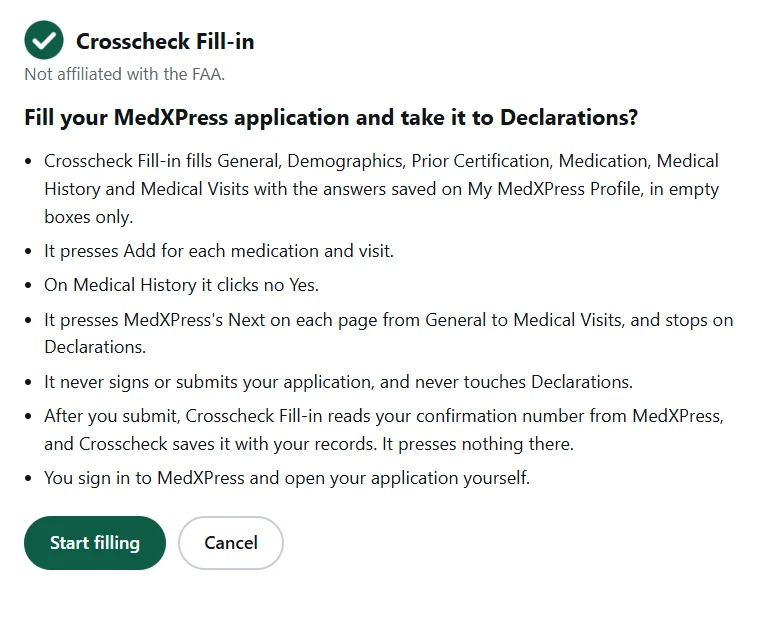
- It fills your MedXPress application one page at a time, from General to Medical Visits.
- It adds your medications and your doctor visits.
- On Medical History, it clicks each Yes you chose and types the explanation you saved. If it can't type one, it shows it to you to copy and paste.
- When a page is filled, it presses Next.
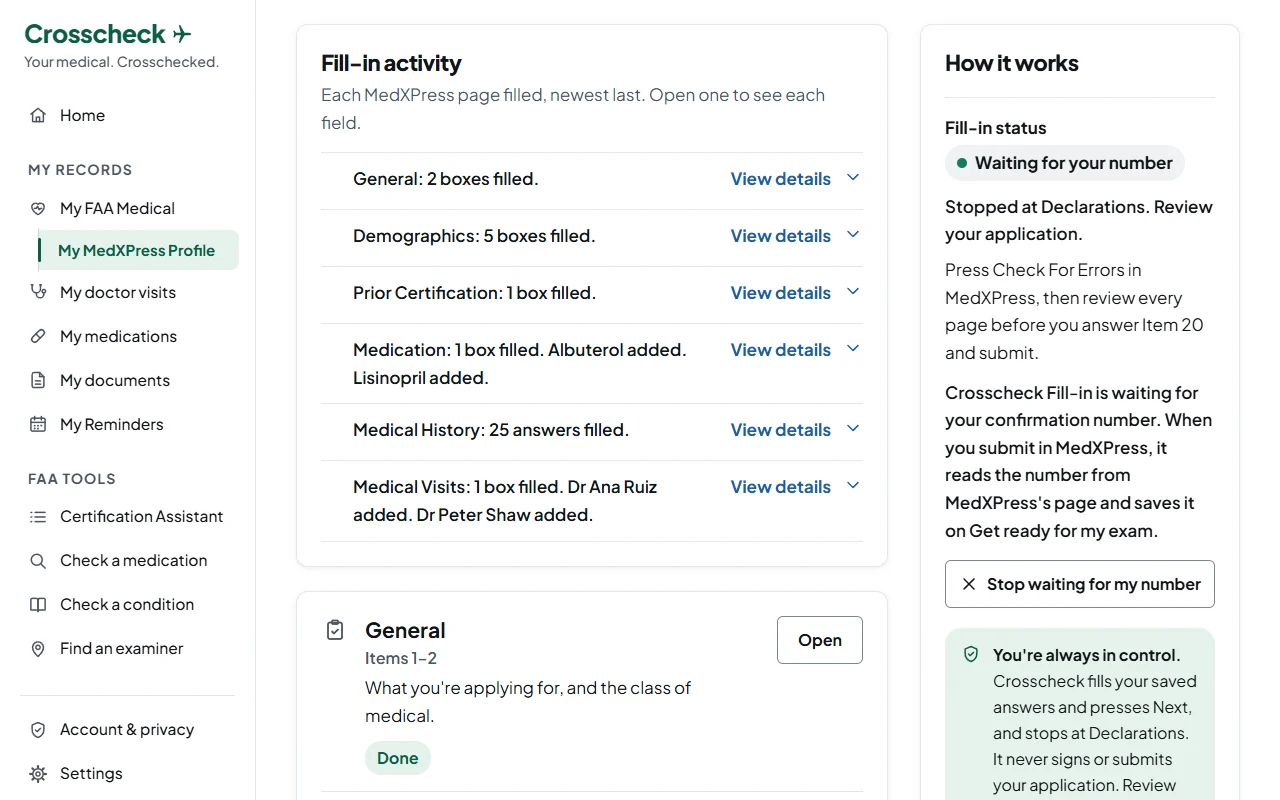
- It stops at Declarations, so you can check everything.
- If a page needs you, it doesn't press Next there, and Crosscheck tells you what to do.
- When you submit, it brings back your confirmation number and saves it on Get ready for my exam.
What it never does
- It never enters your Social Security number.
- It never answers Item 20.
- It never signs or submits your application.
- It never changes an answer already in MedXPress. It fills only empty boxes.
- It never chooses an answer for you. It types only what you saved.
- The pages before the form are yours: why you're applying and the Pilot's Bill of Rights. So is Declarations.
Get it
When you add it, Crosscheck Fill-in shows a short notice once. Press I agree to use it.
On an iPhone, iPad or Android phone, Fill in MedXPress is coming to the Crosscheck app.
How to use it
Before you start, save your answers on My MedXPress Profile, and add Crosscheck Fill-in to your browser.
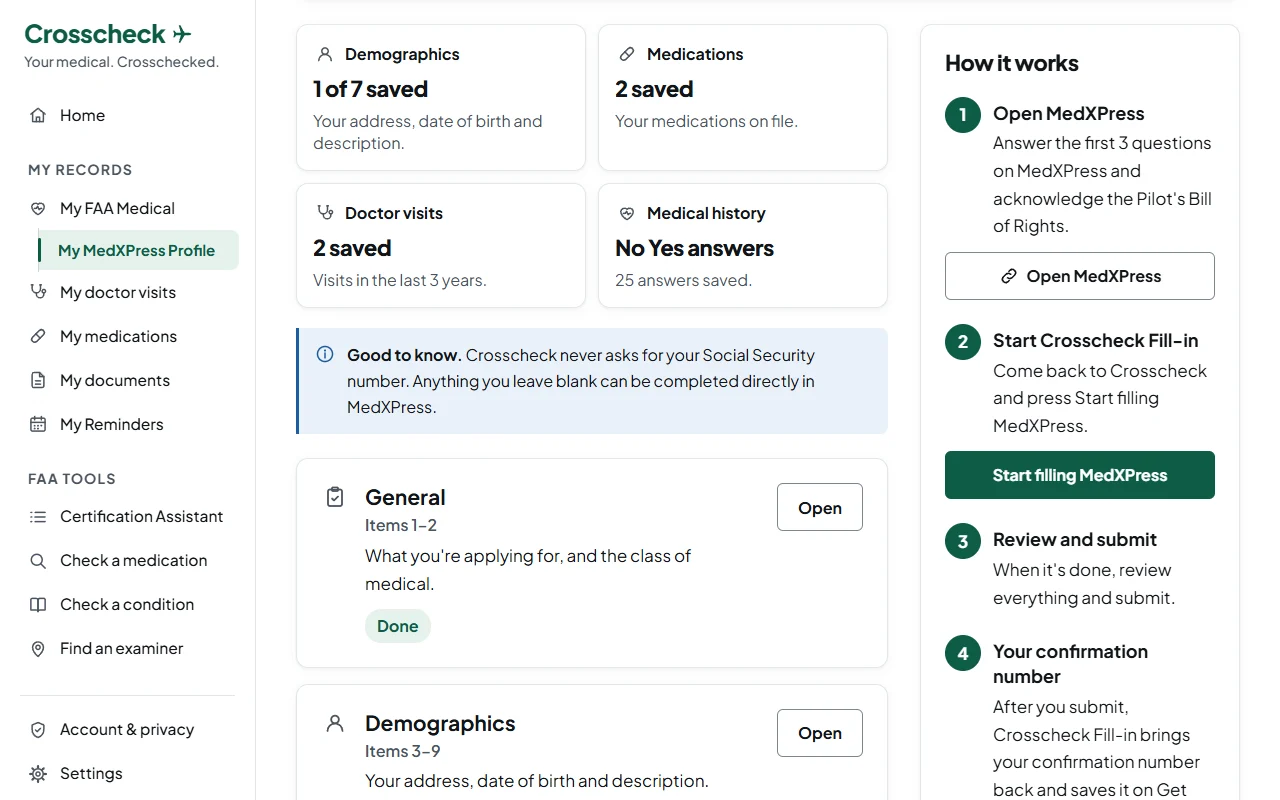
Open MedXPress
Answer the first 3 questions on MedXPress and acknowledge the Pilot's Bill of Rights.
Start Crosscheck Fill-in
Come back to Crosscheck and press Start filling MedXPress.
A small Crosscheck Fill-in window opens once and lists what it will do. Press Start filling there.
Review and submit
When it's done, review everything and submit.
At Declarations, the window opens once more and says what it did. Press I'll review my application there.
Your confirmation number
After you submit, Crosscheck Fill-in brings your confirmation number back and saves it on Get ready for my exam. Your examiner needs it to open your application.
Check everything
You are responsible for every answer on your application.
Crosscheck Fill-in types only what you saved. Look at every page in MedXPress and fix anything that isn't right.
Press Check For Errors in MedXPress, then review every page before you answer Item 20 and submit.
Questions
Does Crosscheck see my MedXPress password?
No. You sign in to MedXPress yourself. Crosscheck Fill-in doesn't read or keep your password, and it fills nothing while MedXPress is asking you to sign in.
Does Crosscheck Fill-in keep anything?
It saves one thing: the date you agreed to its notice, kept in your browser. When you press Start, Crosscheck gives Fill-in the answers for this fill. Fill-in keeps them only in memory while it fills, never saves them, and erases them when it stops. Removing Crosscheck Fill-in from your browser removes that date too.
What if MedXPress changes?
Crosscheck Fill-in checks each page against the MedXPress it knows. If a page looks different, it fills nothing there and tells you. You then fill that page yourself.
Which browsers does it work in?
Google Chrome on a computer. Chrome on a phone or tablet doesn't take add-ons.
On an iPhone, iPad or Android phone, Fill in MedXPress is coming to the Crosscheck app.
Is it affiliated with the FAA?
No. Crosscheck and Crosscheck Fill-in are not affiliated with or endorsed by the FAA.